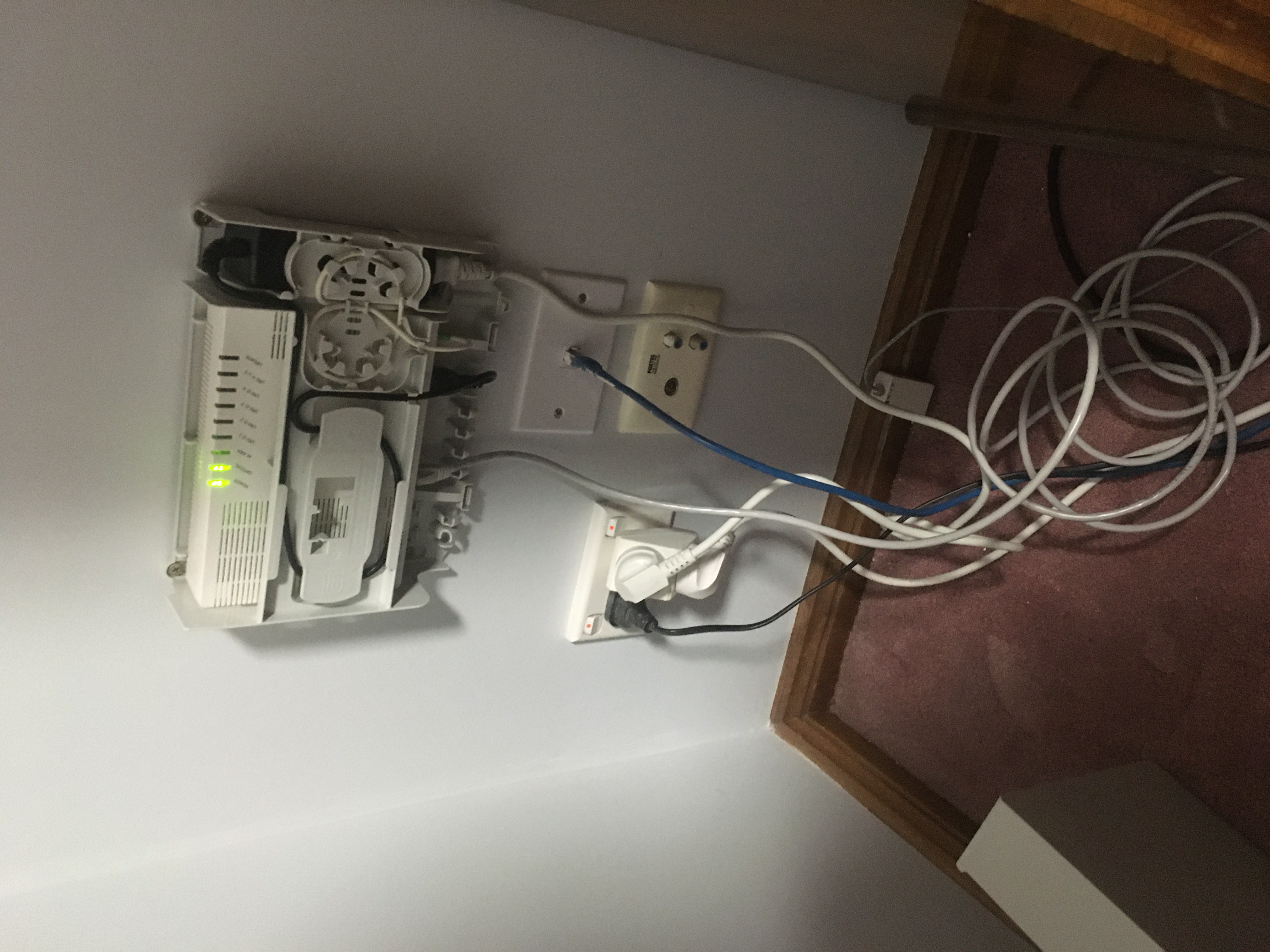
Guess who got fibre installed today?
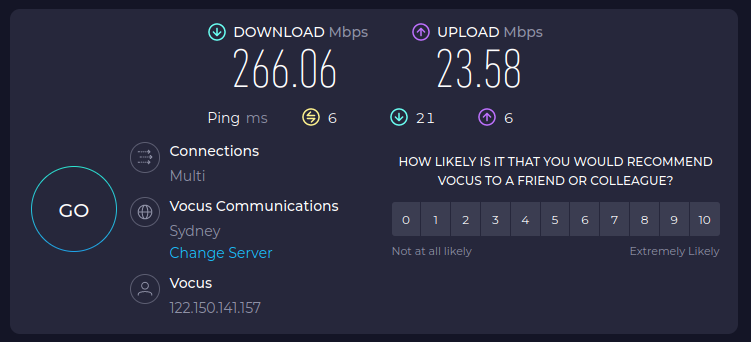
We’ve gone from 100 Mbps down to 250 Mbps down. The fibre optic line can support more but we’re on a 250 Mbps plan.

Guess who got fibre installed today?
We’ve gone from 100 Mbps down to 250 Mbps down. The fibre optic line can support more but we’re on a 250 Mbps plan.
Hey Craig. I’ve made some changes (hopefully improvements!) to the website:
Only the home page is working at the moment. I will get the other pages working soon, hopefully today.
Please do let me know (in no uncertain terms!) what you think of the new design. I’ve gone “mobile first”, so it should look respectable on your smart phone.
There’s been a little bit of spring cleaning around here today!
I’m trying to get my house in order so I can pass myself off as respectable when I start promoting my new show In The Lab With Jay Jay in earnest.
To that end I have reviewed the look and feel of my wiki. It no longer has that black, green, and orange monospaced font vibe going on, but now uses the relatively unoffensive default theme.
It’s not using the latest Vector theme, but rather the legacy one. This was deliberate because I have a lot of big tables in my wiki (such as on my computers and shopping pages) and the legacy theme plays nicer with those.
I’ve also been tweaking the website for my show, including an updated about page.
The blog, the wiki, and the show also now all use my new favicon which is my take on the Hacker Emblem:

Man. So. Today, this happened. I was watching a new video from Adrian Black and his EEVBlog multimeter failed:
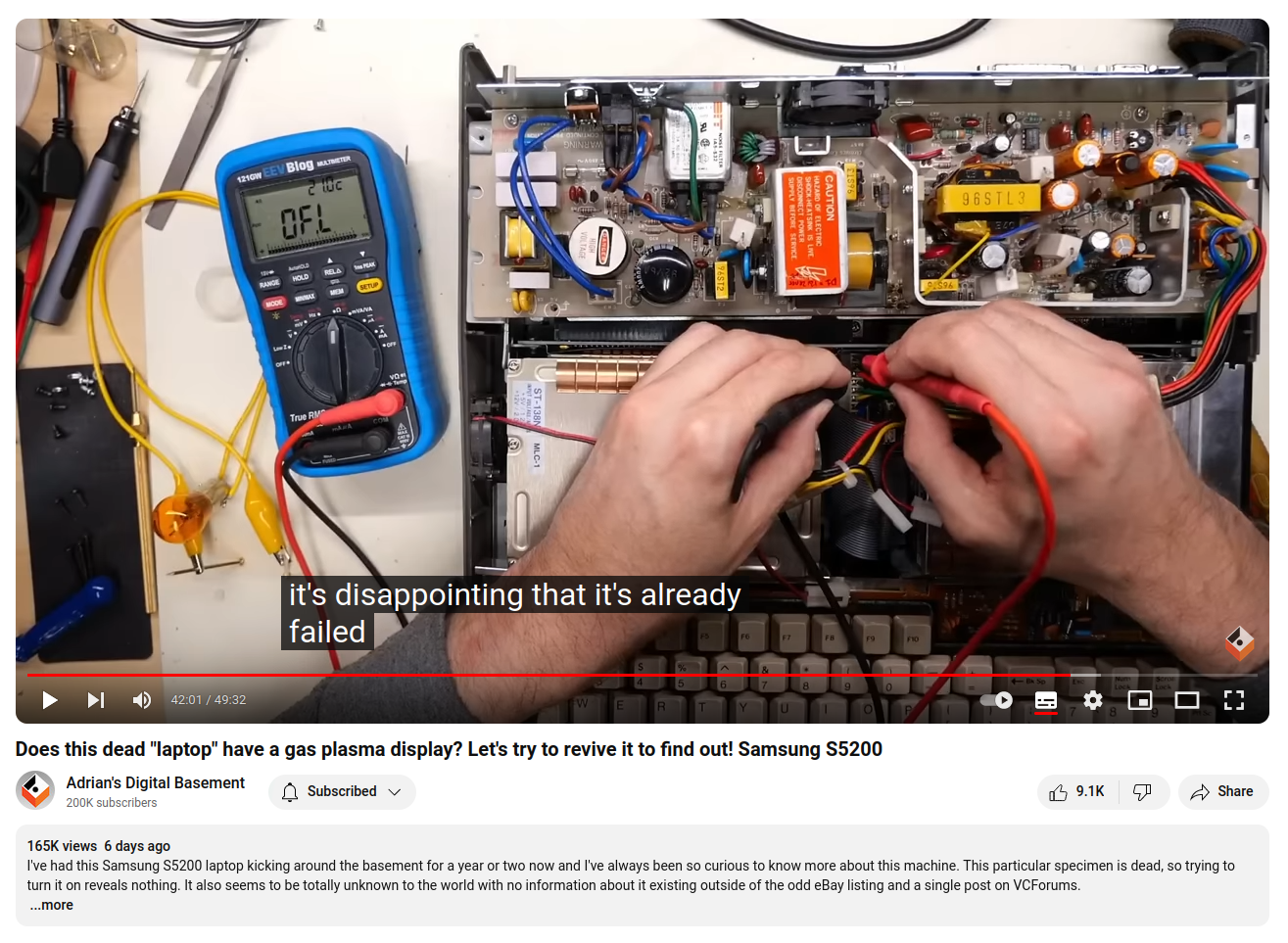
I have been saving my pennies and planning to buy an EEVBlog 121GW Multimeter because a lot of the makers around the interwebs have one as a nod to Dave Jones over on the EEVBlog, but that’s just so embarrassing that it’s failing. Of all the equipment you have you need to trust your test equipment the most and this is… well, just sad I guess.
I’ve been busy working away on the website for In The Lab With Jay Jay: https://www.inthelabwithjayjay.com/in-the-lab/
The bit that took the most time was getting the affiliate links for equipment working: https://www.inthelabwithjayjay.com/in-the-lab/equipment.php
These are some notes for Future John.
I believe our current nbn connection is FTTC (fiber to the curb). Our nbn plan with Dodo is the “nbn 100” plan which is AU$85/mo for 95Mbps down.
They are offering a “fiber upgrade” which will presumably be FTTP (fiber to the premises). Once that is connected we are eligible for the “Home Superfast” plan which is AU$110/mo for 200Mbps down.
There are more details here:
So it seems that my trouble with chromium is not over. Today a new twist. Thank God I still have Firefox! I will try updating and rebooting again, but can’t do that at the moment.
-------------------
Mon Nov 20 10:11:08 [bash:5.2.15 jobs:0 error:0 time:0]
jj5@charisma:/home/jj5
$ chromium
[4085207:4085207:1120/101109.660602:ERROR:policy_logger.cc(157)] :components/enterprise/browser/controller/chrome_browser_cloud_management_controller.cc(163) Cloud management controller initialization aborted as CBCM is not enabled.
[4085207:4085238:1120/101109.672026:ERROR:login_database.cc(1100)] Password decryption failed, encryption_result is 2
[4085207:4085238:1120/101109.672044:ERROR:login_database.cc(1100)] Password decryption failed, encryption_result is 2
[4085207:4085238:1120/101109.672050:ERROR:login_database.cc(1100)] Password decryption failed, encryption_result is 2
[4085207:4085238:1120/101109.672055:ERROR:login_database.cc(1100)] Password decryption failed, encryption_result is 2
[4085207:4085238:1120/101109.672061:ERROR:login_database.cc(1100)] Password decryption failed, encryption_result is 2
[4085207:4085238:1120/101109.672064:ERROR:login_database.cc(1100)] Password decryption failed, encryption_result is 2
[4085207:4085238:1120/101109.672075:ERROR:login_database.cc(1100)] Password decryption failed, encryption_result is 2
[4085207:4085238:1120/101109.672079:ERROR:login_database.cc(1100)] Password decryption failed, encryption_result is 2
[4085207:4085238:1120/101109.672082:ERROR:login_database.cc(1100)] Password decryption failed, encryption_result is 2
[4085207:4085238:1120/101109.672086:ERROR:login_database.cc(1100)] Password decryption failed, encryption_result is 2
[4085207:4085238:1120/101109.672091:ERROR:login_database.cc(1100)] Password decryption failed, encryption_result is 2
[4085207:4085238:1120/101109.672098:ERROR:login_database.cc(1100)] Password decryption failed, encryption_result is 2
[4085207:4085238:1120/101109.672107:ERROR:login_database.cc(1100)] Password decryption failed, encryption_result is 2
[4085207:4085238:1120/101109.672115:ERROR:login_database.cc(1100)] Password decryption failed, encryption_result is 2
[4085207:4085238:1120/101109.672132:ERROR:login_database.cc(1100)] Password decryption failed, encryption_result is 2
[4085207:4085238:1120/101109.672147:ERROR:login_database.cc(1100)] Password decryption failed, encryption_result is 2
[4085207:4085238:1120/101109.672154:ERROR:login_database.cc(1100)] Password decryption failed, encryption_result is 2
[4085207:4085238:1120/101109.672159:ERROR:login_database.cc(1100)] Password decryption failed, encryption_result is 2
[4085207:4085238:1120/101109.672165:ERROR:login_database.cc(1100)] Password decryption failed, encryption_result is 2
[4085207:4085238:1120/101109.672169:ERROR:login_database.cc(1100)] Password decryption failed, encryption_result is 2
[4085207:4085238:1120/101109.672173:ERROR:login_database.cc(1100)] Password decryption failed, encryption_result is 2
[4085207:4085238:1120/101109.672178:ERROR:login_database.cc(1100)] Password decryption failed, encryption_result is 2
[4085207:4085238:1120/101109.672185:ERROR:login_database.cc(1100)] Password decryption failed, encryption_result is 2
[4085207:4085238:1120/101109.672193:ERROR:login_database.cc(1100)] Password decryption failed, encryption_result is 2
[4085207:4085207:1120/101109.758579:ERROR:cmd_buffer_helper.cc(141)] ContextResult::kFatalFailure: CommandBufferHelper::AllocateRingBuffer() failed
Fontconfig error: Cannot load default config file: No such file: (null)
[1120/101109.770548:ERROR:elf_dynamic_array_reader.h(64)] tag not found
[1120/101109.770620:ERROR:elf_dynamic_array_reader.h(64)] tag not found
30185030681216:error:1000007d:SSL routines:OPENSSL_internal:CERTIFICATE_VERIFY_FAILED:../../third_party/boringssl/src/ssl/handshake.cc:393:
Trace/breakpoint trap (core dumped)
-------------------
// 2023-11-22 jj5 – UPDATE: a reboot fixed this problem.
Today I was referred to Cory Doctorow‘s new book: The Internet Con: How To Seize the Means of Computation. Apparently it’s basically just about the idea that web services should interoperate. I’m not going to read this one, but you might?
Just some notes about web pages I was reading today.