
Missing libtool when preparing to build rockbox

UPDATE: the solution to this problem was to install the package ‘libtool-bin’.

I am following these instructions: https://git.rockbox.org/cgit/rockbox.git/tree/docs/README and am having this problem:

-------------------
Wed Jun 12 16:02:02 [bash:5.2.15 jobs:0 error:0 time:4385]
jj5@virtuoso:/home/jj5/repo/git/git.rockbox.org
$ git clone git://git.rockbox.org/rockbox
Cloning into 'rockbox'...
remote: Enumerating objects: 294287, done.
remote: Counting objects: 100% (294287/294287), done.
remote: Compressing objects: 100% (65094/65094), done.
remote: Total 294287 (delta 229471), reused 292590 (delta 227774), pack-reused 0 (from 0)
Receiving objects: 100% (294287/294287), 171.09 MiB | 3.97 MiB/s, done.
Resolving deltas: 100% (229471/229471), done.
-------------------
Wed Jun 12 16:03:02 [bash:5.2.15 jobs:0 error:0 time:4445]
jj5@virtuoso:/home/jj5/repo/git/git.rockbox.org
$ cd rockbox
-------------------
Wed Jun 12 16:03:11 [bash:5.2.15 jobs:0 error:0 time:4454]
jj5@virtuoso:/home/jj5/repo/git/git.rockbox.org/rockbox
$ mkdir build
-------------------
Wed Jun 12 16:03:13 [bash:5.2.15 jobs:0 error:0 time:4456]
jj5@virtuoso:/home/jj5/repo/git/git.rockbox.org/rockbox
$ cd build
-------------------
Wed Jun 12 16:03:15 [bash:5.2.15 jobs:0 error:0 time:4458]
jj5@virtuoso:/home/jj5/repo/git/git.rockbox.org/rockbox/build
$ ../tools/rockboxdev.sh
ROCKBOXDEV: "libtool" is required for this script to work.
ROCKBOXDEV: Please install the missing tools and re-run the script.
-------------------

I did install the ‘libtool’ package on my Debian system, but there is no ‘libtool’ command, only ‘libtoolize’.
Learning Clojure

I thought I might start with some of Paul Graham’s famous papers which aren’t about Clojure per se, but are about Lisp:

Also his book On Lisp is of interest and is available free online these days.

And then the Arc language tutorial, which is also not Clojure, but looks like an interesting Lisp.

Then I will read the following books, in this order:

This is, of course, a silly amount of reading. Let’s see how I go.

And… here we are

This week what we have all been fearing has happened to me: GitHub Copilot generated code for me which seems to meet all the requirements but which I don’t understand very much at all.

To date GitHub Copilot for me has just been mostly a useful auto-complete tool and it hasn’t given me any code which I didn’t understand. But with this code (to control two different hardware timers/counters on my Arduino) I don’t really understand it at all. I have passing familiarity with some of the registers used because I saw them named in the datasheet (which I have only skimmed so far) but basically I don’t understand how this works.

It is tempting to ignore the fact that I don’t fully understand and move on, but there’s a part of me which wants to return to the datasheet so I can understand what every assignment GitHub Copilot offered actually does and what every value it calculated implies. Is that the best use of my time?

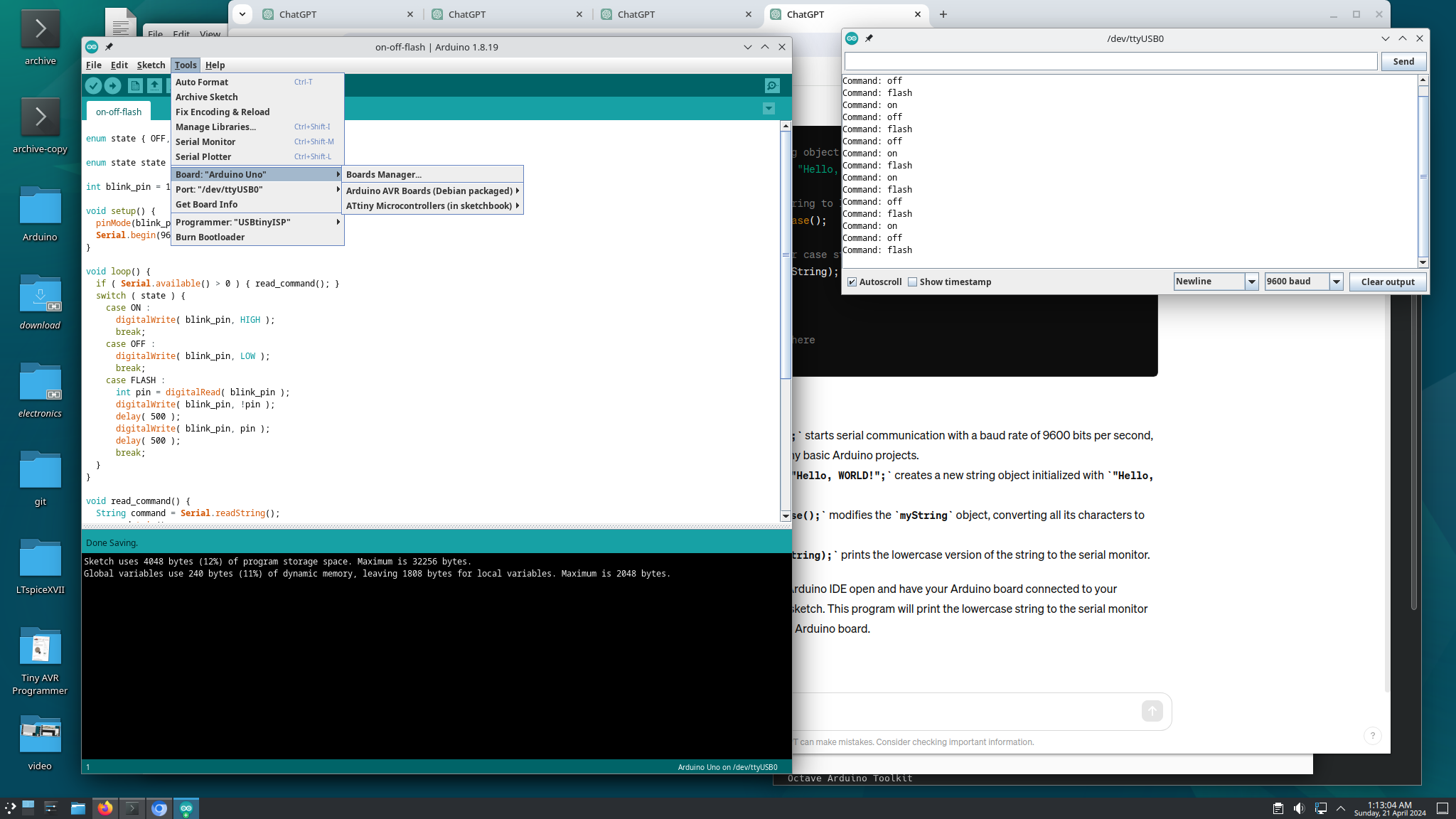
Controlling Arduino Uno with Serial commands

@kline helped me with Phase 1 of my Crustacean Chirpy Chip Challenge project, which I have completed (sort of). I got the programming done but I didn’t do all the reading (yet).

Note to self: My Arduino Uno knockoff identifies itself as a “QinHeng Electronics USB Serial” USB device.

This is my code:

enum state { OFF, ON, FLASH };

enum state state = OFF;

int blink_pin = 13;

void setup() {
  pinMode( blink_pin, OUTPUT );
  Serial.begin( 9600 );
}

void loop() {
  if ( Serial.available() > 0 ) { read_command(); }
  switch ( state ) {
    case ON :
      digitalWrite( blink_pin, HIGH );
      break;
    case OFF :
      digitalWrite( blink_pin, LOW );
      break;
    case FLASH :
      int pin = digitalRead( blink_pin );
      digitalWrite( blink_pin, !pin );
      delay( 500 );
      digitalWrite( blink_pin, pin );
      delay( 500 );
      break;
  }
}

void read_command() {
  String command = Serial.readString();
  command.trim();
  command.toLowerCase();
  Serial.print( "Command: " );
  Serial.println( command );
  if ( command == "on" ) {
    state = ON;
  }
  else if ( command == "off" ) {
    state = OFF;
  }
  else if ( command == "flash" ) {
    state = FLASH;
  }
  else {
    Serial.println( "Unknown command." );
  }
}

This is my setup:

The code which would actually implement the spec, as given:

void read_command() {
  char c = Serial.read();
  switch ( c ) {
    case 'a' :
      state = ON;
      break;
    case 's' :
      state = OFF;
      break;
  }
}