
Today I was reading Some SQL Tricks of an Application DBA and I learned about the RandomizedDelaySec systemd option.
Author Archives: Jay Jay
How to Automatically Clear Browsing History in Chrome on Exit
Today I read How to Automatically Clear Browsing History in Chrome on Exit and learned how to clear cookies etc when closing the Chromium web browser. Basically it’s Settings -> Privacy and security -> Site settings -> Cookies and site data -> Clear cookies and site data when you quit Chromium.
These are not the codes that you’re looking for
So I was playing Doom3, an old favourite. And I came upon this screen:
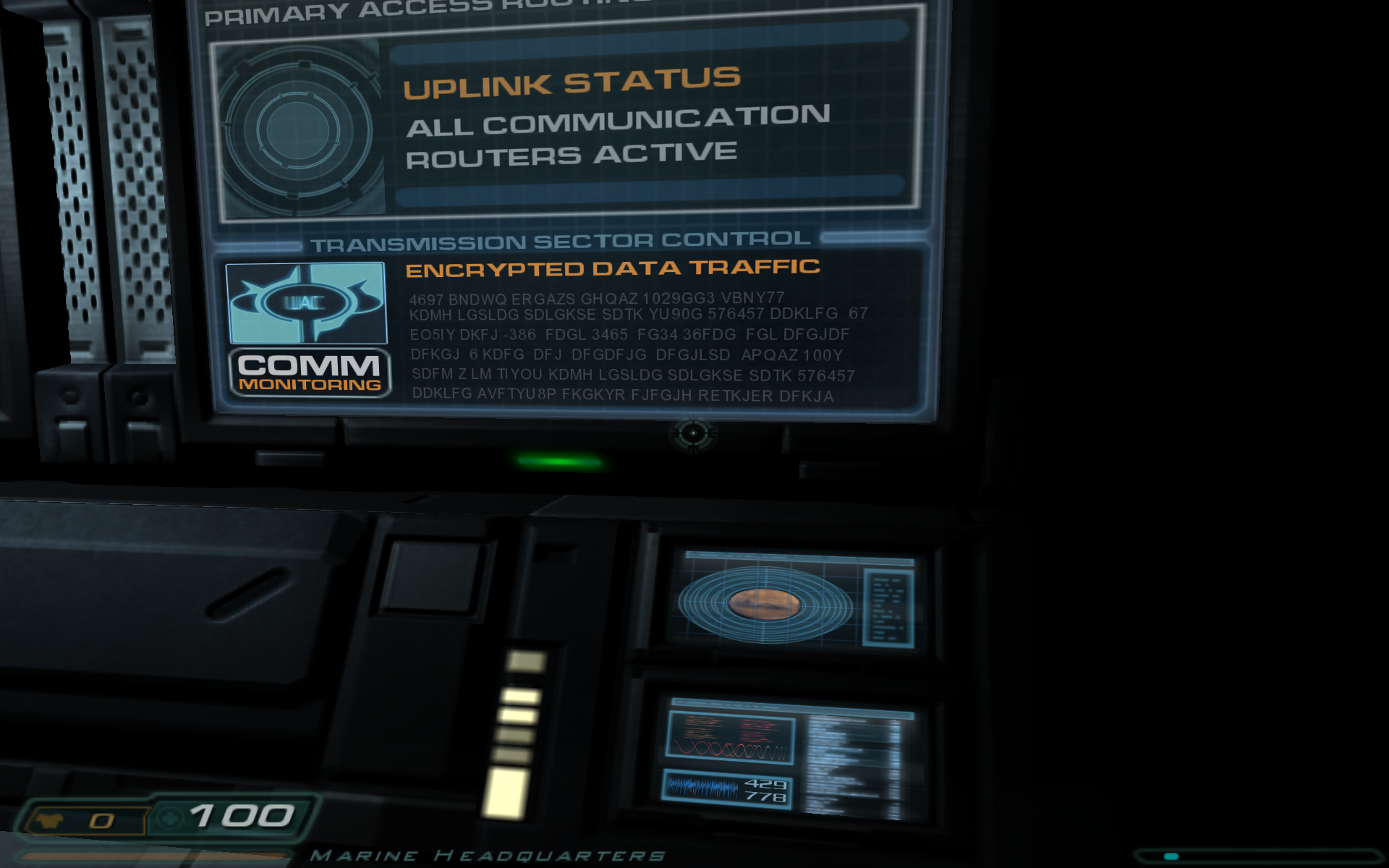
The “encrypted” data is:
4697 BNDWQ ERGAZS GHQAZ 1029GG3 VBNY77
KDMH LGSLDG SDLGKSE SDTK YU90G 576457 DDKLFG 67
EO5IY DKFJ -386 FDGL 3465 FG34 36FDG FGL DFGJDF
DFKGJ 6 KDFG DFJ DFGDFJG DFGJLSD APQAZ 100Y
SDFM Z LM TIYOU KDMH LGSLDG SDLGKSE SDTK 576457
DDKLFG AVFTYU8P FKGKYR FJFGJH RETKJER DFKJA
It didn’t look random enough to me, meaning it was possibly encoded, so I started poking at it.
The first thing I tried was ROT13, but that wasn’t it.
I then tried mapping the alphabet to the reverse alphabet (my sister’s idea), but that wasn’t it either.
Then I ran this PHP program:
function main() {

  $text = file_get_contents( 'doom3-notes.txt' );

  freqhist( $text );

}

function freqhist( $text ) {

  $map = [];
  $len = strlen( $text );

  for ( $i = 0; $i < $len; $i++ ) {

    $char = $text[ $i ];

    if ( $char === "\n" || $char === ' ' ) { continue; }

    inc( $map, $char );

  }

  asort( $map );

  report( $map );

}

function inc( &$map, $char ) {

  if ( ! array_key_exists( $char, $map ) ) { $map[ $char ] = 0; }

  $map[ $char ]++;

}

function report( $map ) {

  echo "size: " . count( $map ) . "\n";

  foreach ( $map as $char => $count ) {

    echo "$char: $count\n";

  }
}
And the output was:
size: 35
-: 1
W: 1
2: 1
P: 2
1: 2
8: 2
B: 2
N: 2
I: 2
O: 2
V: 2
9: 3
Q: 3
U: 3
M: 4
0: 4
H: 4
Z: 4
R: 4
T: 5
4: 5
3: 5
A: 6
5: 6
E: 6
Y: 7
6: 8
7: 8
J: 10
S: 11
L: 12
K: 15
F: 21
G: 25
D: 27
And this report was enough for me to deduce what had happened. This was obviously the work of a busy designer entering “random” data from their QWERTY keyboard.
You can tell because all the frequently occurring letters D, G, F, K, L, etc. are all on the home row on a QWERTY keyboard. Someone sat there pressing “random” keys. It’s not an encoded message.
Puzzle solved. But a little disappointing.
Restart Zabbix agent on Mac OS X
The configuration file is in /usr/local/etc/zabbix/zabbix_agentd.conf. If you make changes you can restart with:
# launchctl stop com.zabbix.zabbix_agentd
# launchctl start com.zabbix.zabbix_agentd
Zabbix server out of memory issue
So I found an issue in my syslog like the below. I edited the /etc/zabbix/zabbix_server.conf file and changed CacheSize=8M to CacheSize=16M.
Jul 22 20:27:35 knowledge zabbix_server[2778]: Starting Zabbix Server. Zabbix 4.4.10 (revision 4db30afc70).
Jul 22 20:27:35 knowledge zabbix_server[2778]: ****** Enabled features ******
Jul 22 20:27:35 knowledge zabbix_server[2778]: SNMP monitoring:           YES
Jul 22 20:27:35 knowledge zabbix_server[2778]: IPMI monitoring:           YES
Jul 22 20:27:35 knowledge systemd[1]: Started Zabbix Server.
Jul 22 20:27:35 knowledge zabbix_server[2778]: Web monitoring:            YES
Jul 22 20:27:35 knowledge zabbix_server[2778]: VMware monitoring:         YES
Jul 22 20:27:35 knowledge zabbix_server[2778]: SMTP authentication:       YES
Jul 22 20:27:35 knowledge zabbix_server[2778]: ODBC:                      YES
Jul 22 20:27:35 knowledge zabbix_server[2778]: SSH support:               YES
Jul 22 20:27:35 knowledge zabbix_server[2778]: IPv6 support:              YES
Jul 22 20:27:35 knowledge zabbix_server[2778]: TLS support:               YES
Jul 22 20:27:35 knowledge zabbix_server[2778]: ******************************
Jul 22 20:27:35 knowledge zabbix_server[2778]: using configuration file: /etc/zabbix/zabbix_server.conf
Jul 22 20:27:35 knowledge zabbix_server[2778]: current database version (mandatory/optional): 04040000/04040002
Jul 22 20:27:35 knowledge zabbix_server[2778]: required mandatory version: 04040000
Jul 22 20:27:35 knowledge zabbix_server[2778]: server #0 started [main process]
Jul 22 20:27:35 knowledge zabbix_server[2784]: server #1 started [configuration syncer #1]
Jul 22 20:27:35 knowledge zabbix_server[2784]: __mem_malloc: skipped 0 asked 24 skip_min 18446744073709551615 skip_max 0
Jul 22 20:27:35 knowledge zabbix_server[2784]: [file:dbconfig.c,line:94] __zbx_mem_realloc(): out of memory (requested 24 bytes)
Jul 22 20:27:35 knowledge zabbix_server[2784]: [file:dbconfig.c,line:94] __zbx_mem_realloc(): please increase CacheSize configuration parameter
Jul 22 20:27:35 knowledge zabbix_server[2784]: === memory statistics for configuration cache ===
Jul 22 20:27:35 knowledge zabbix_server[2784]: min chunk size: 18446744073709551615 bytes
Jul 22 20:27:35 knowledge zabbix_server[2784]: max chunk size:          0 bytes
Jul 22 20:27:35 knowledge zabbix_server[2784]: memory of total size 8388232 bytes fragmented into 70489 chunks
Jul 22 20:27:35 knowledge zabbix_server[2784]: of those,          0 bytes are in        0 free chunks
Jul 22 20:27:35 knowledge zabbix_server[2784]: of those,    7260424 bytes are in    70489 used chunks
Jul 22 20:27:35 knowledge zabbix_server[2784]: ================================
Jul 22 20:27:35 knowledge zabbix_server[2784]: === Backtrace: ===
Jul 22 20:27:35 knowledge zabbix_server[2784]: 11: /usr/sbin/zabbix_server: configuration syncer [syncing configuration](zbx_backtrace+0x4e) [0x55803bd6662b]
Jul 22 20:27:35 knowledge zabbix_server[2784]: 10: /usr/sbin/zabbix_server: configuration syncer [syncing configuration](__zbx_mem_realloc+0x160) [0x55803bd619af]
Jul 22 20:27:35 knowledge zabbix_server[2784]: 9: /usr/sbin/zabbix_server: configuration syncer [syncing configuration](+0x18c453) [0x55803bd27453]
Jul 22 20:27:35 knowledge zabbix_server[2784]: 8: /usr/sbin/zabbix_server: configuration syncer [syncing configuration](+0x19889b) [0x55803bd3389b]
Jul 22 20:27:35 knowledge zabbix_server[2784]: 7: /usr/sbin/zabbix_server: configuration syncer [syncing configuration](DCsync_configuration+0x12d7) [0x55803bd34de6]
Jul 22 20:27:35 knowledge zabbix_server[2784]: 6: /usr/sbin/zabbix_server: configuration syncer [syncing configuration](dbconfig_thread+0x116) [0x55803bbeb021]
Jul 22 20:27:35 knowledge zabbix_server[2784]: 5: /usr/sbin/zabbix_server: configuration syncer [syncing configuration](zbx_thread_start+0x37) [0x55803bd74862]
Jul 22 20:27:35 knowledge zabbix_server[2784]: 4: /usr/sbin/zabbix_server: configuration syncer [syncing configuration](MAIN_ZABBIX_ENTRY+0x996) [0x55803bbdca4e]
Jul 22 20:27:35 knowledge zabbix_server[2784]: 3: /usr/sbin/zabbix_server: configuration syncer [syncing configuration](daemon_start+0x2ff) [0x55803bd65d8c]
Jul 22 20:27:35 knowledge zabbix_server[2784]: 2: /usr/sbin/zabbix_server: configuration syncer [syncing configuration](main+0x305) [0x55803bbdc0a2]
Jul 22 20:27:35 knowledge zabbix_server[2784]: 1: /lib/x86_64-linux-gnu/libc.so.6(__libc_start_main+0xe7) [0x7fd8e5ea1b97]
Jul 22 20:27:35 knowledge zabbix_server[2784]: 0: /usr/sbin/zabbix_server: configuration syncer [syncing configuration](_start+0x2a) [0x55803bbdb11a]
Jul 22 20:27:35 knowledge zabbix_server[2778]: One child process died (PID:2784,exitcode/signal:1). Exiting ...
Jul 22 20:27:35 knowledge zabbix_server[2778]: syncing trend data...
Jul 22 20:27:35 knowledge zabbix_server[2778]: syncing trend data done
Jul 22 20:27:35 knowledge zabbix_server[2778]: Zabbix Server stopped. Zabbix 4.4.10 (revision 4db30afc70).
Open current tab duplicate in new window in Firefox
So I read about Firefox shortcuts and I figured to open the current tab in a new window:
- Ctrl+L
- Shift+Enter
Raspberry Pi
So there’s a thread over at ProgClub about me and my new Pi. I definitely gotta get me some more of these!
Logitech forums post for Z607 speaker mounts
So I asked about Z607 speaker mounting options over on the Logitech forums. Haven’t heard back yet, hope that I do.
Remove Boot Text On The Raspberry Pi For Noobs
Today I read Remove Boot Text On The Raspberry Pi For Noobs:
vim /boot/cmdline.txt
You will see a single line with all the boot options. Scroll along and change the following making sure not to add any linebreaks:
- Replace console=tty1 to console=tty3 to redirect boot messages to the third console.
- Add loglevel=3 to disable non-critical kernel log messages.
- Add logo.nologo to the end of the line to remove the Raspberry PI logos from displaying
vim /boot/config.txt
- add disable_splash=1 at the end of the file.
Axiomatic CSS and Lobotomized Owls
Today I learned about the “Lobotomized Owl” CSS selector over on Axiomatic CSS and Lobotomized Owls.