
Today I was reading about Shadow IT over on Wikipedia.
Author Archives: Jay Jay
NetBeans red line
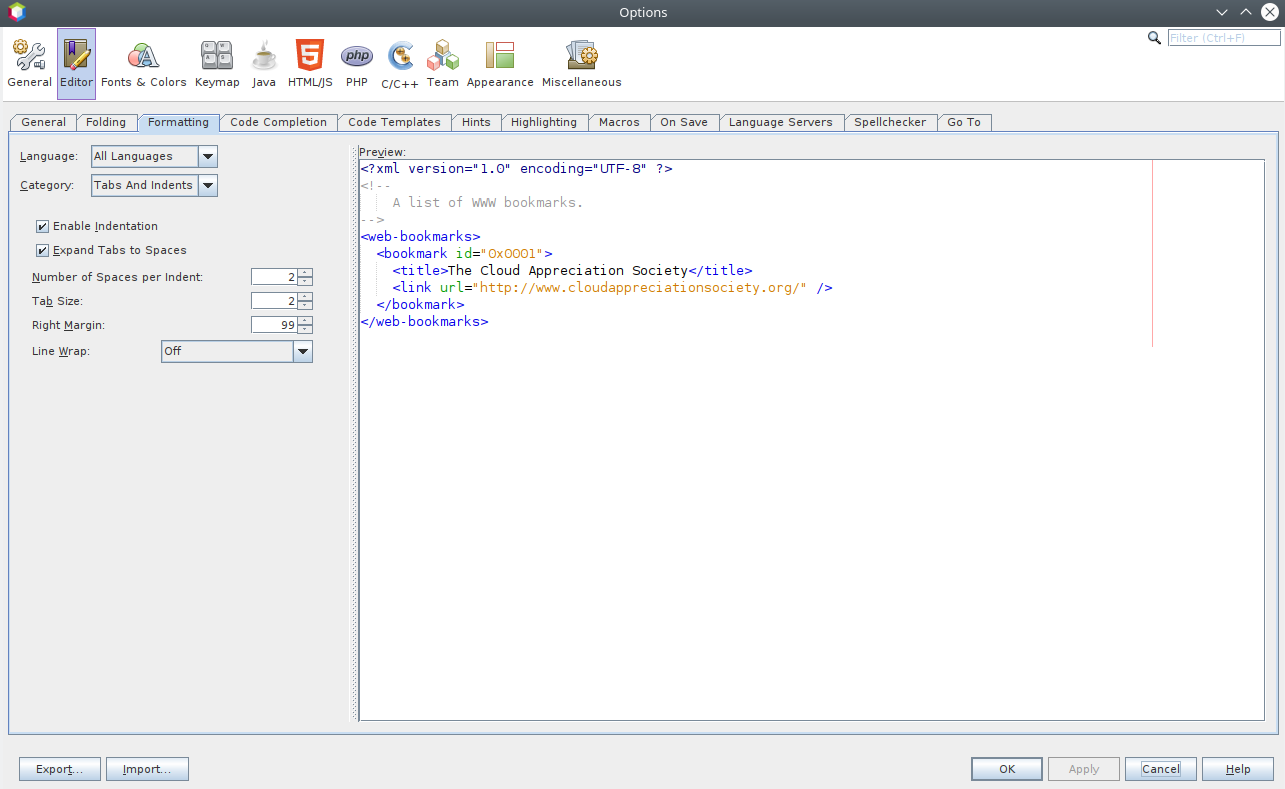
There is a feature of NetBeans where it puts a red line as the right margin in the code editor. By default this margin is at 80 characters but I prefer it at 99 characters. To change the setting in NetBeans see Tools -> Options -> Editor -> Formatting -> All Languages -> Tabs And Indents -> Right Margin. For example:
VirtualBox reference configuration for Kubuntu 18.04 hosts and Kubuntu 18.04 guests
See my reference configuration for hardware selections which worked well for me when running Kubuntu 18.04 guests on Kubuntu 18.04 hosts.
After configuring your VM you might like to read about installing Kubuntu on it.
Installing Kubuntu
So basically I want to run KDE Plasma under Ubuntu and this can be called Kubuntu.
This article is a little bit cargo-clutish. I.e. “I did this and it seemed to work.” and “I don’t do this because it didn’t seem to work.”
I have a pretty heavy reliance on Salt Stack for system configuration. My salt config is all built around Ubuntu 18.04 LTS.
When I need to install a Kubuntu desktop, this is how I do it:
- install Ubuntu Server 18.04 LTS from live installer
- apt update && apt dist-upgrade && apt autoremove && reboot
- apt install kubuntu-desktop && reboot
- apt install virtualbox-guest-dkms virtualbox-guest-utils virtualbox-guest-x11 && reboot
- apt install salt-minion
- vim /etc/salt/minion_id
- vim /etc/salt/minion.d/minion.conf
- master: salt.staticmagic.net
- service salt-minion restart
- salt-call state.highstate
Note that if your Kubuntu install is a VirtualBox guest you need to start it with a normal start if you want the shared clipboard to work. If you start headless or detachable the shared clipboard will not work (in my experience).
If your Kubuntu install is not a VirtualBox guest you can skip the virtualbox-guest-* package installation above.
Shared clipboard for Ubuntu 18.04 guest in Ubutnu 18.04 host under VirtualBox 6.0
My shared clipboard wasn’t working for my Ubuntu 18.04 guests running on my Ubutnu 18.04 host under VirtualBox 6.0.
To fix first make sure that the shared clipboard is enabled in VirtualBox for the VM. The setting for that is under General -> Advanced -> Shared Clipboard.
Then try running these commands in the guest:
- sudo apt install virtualbox-guest-dkms virtualbox-guest-utils virtualbox-guest-x11
- sudo reboot
These steps (or something similar) got the shared clipboard working for me. Hooray!
Note that these instructions will vary if you’re running a HWE kernel.
network.http.sendRefererHeader
To disable the HTTP Referrer (Referer) header in Firefox open about:config and set network.http.sendRefererHeader to zero.
Everything you need (and don’t need) to know about PHP’s type system
I read Everything you need (and don’t need) to know about PHP’s type system, it was interesting. My favourite quote was at the end:
“I believe php’s type system is incredibly rich and carries many innovative and legacy features and they all make much sense when you look at the history of the language development.”
systemd RandomizedDelaySec
Today I was reading Some SQL Tricks of an Application DBA and I learned about the RandomizedDelaySec systemd option.
How to Automatically Clear Browsing History in Chrome on Exit
Today I read How to Automatically Clear Browsing History in Chrome on Exit and learned how to clear cookies etc when closing the Chromium web browser. Basically it’s Settings -> Privacy and security -> Site settings -> Cookies and site data -> Clear cookies and site data when you quit Chromium.
These are not the codes that you’re looking for
So I was playing Doom3, an old favourite. And I came upon this screen:
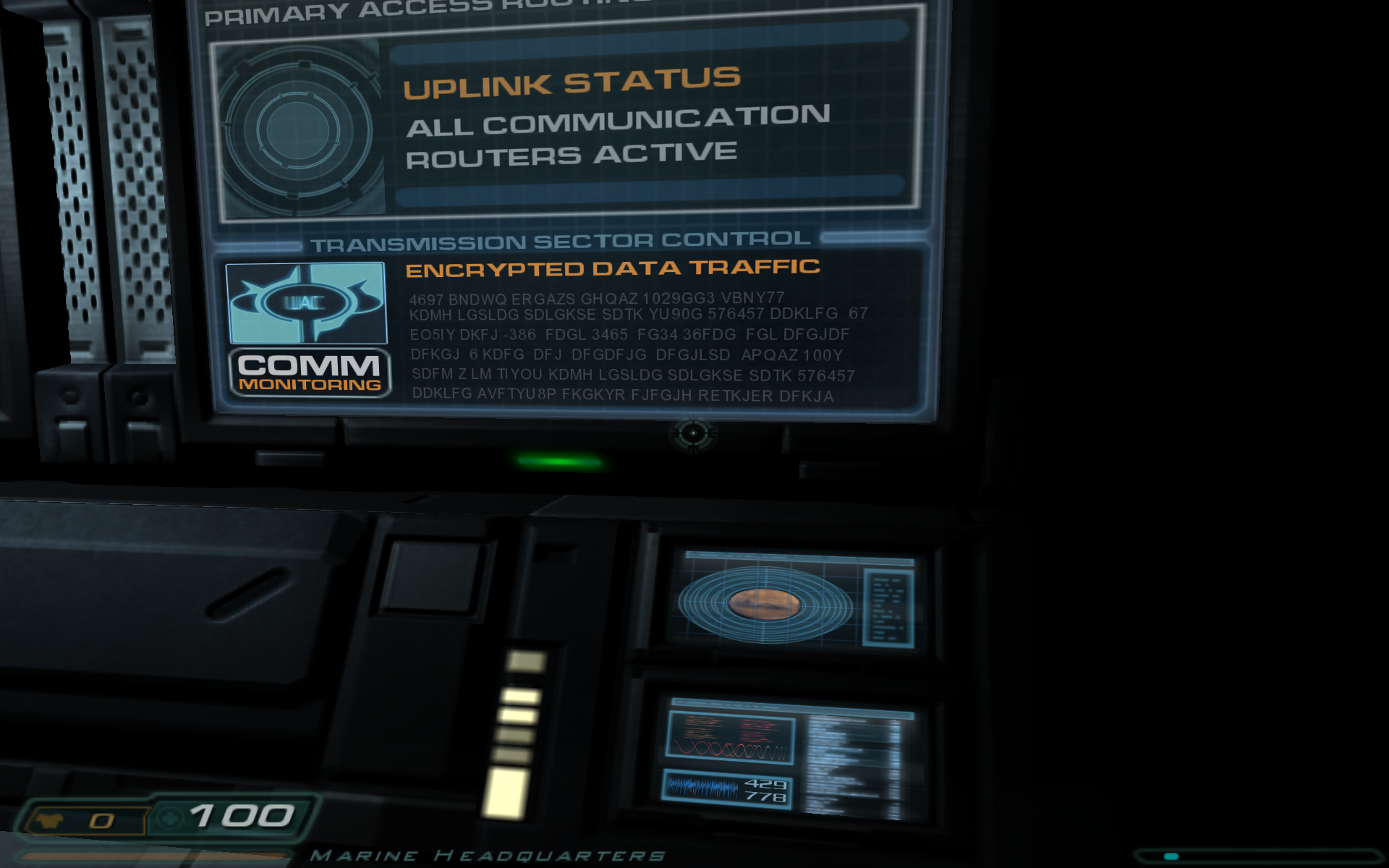
The “encrypted” data is:
4697 BNDWQ ERGAZS GHQAZ 1029GG3 VBNY77
KDMH LGSLDG SDLGKSE SDTK YU90G 576457 DDKLFG 67
EO5IY DKFJ -386 FDGL 3465 FG34 36FDG FGL DFGJDF
DFKGJ 6 KDFG DFJ DFGDFJG DFGJLSD APQAZ 100Y
SDFM Z LM TIYOU KDMH LGSLDG SDLGKSE SDTK 576457
DDKLFG AVFTYU8P FKGKYR FJFGJH RETKJER DFKJA
It didn’t look random enough to me, meaning it was possibly encoded, so I started poking at it.
The first thing I tried was ROT13, but that wasn’t it.
I then tried mapping the alphabet to the reverse alphabet (my sister’s idea), but that wasn’t it either.
Then I ran this PHP program:
function main() {

  $text = file_get_contents( 'doom3-notes.txt' );

  freqhist( $text );

}

function freqhist( $text ) {

  $map = [];
  $len = strlen( $text );

  for ( $i = 0; $i < $len; $i++ ) {

    $char = $text[ $i ];

    if ( $char === "\n" || $char === ' ' ) { continue; }

    inc( $map, $char );

  }

  asort( $map );

  report( $map );

}

function inc( &$map, $char ) {

  if ( ! array_key_exists( $char, $map ) ) { $map[ $char ] = 0; }

  $map[ $char ]++;

}

function report( $map ) {

  echo "size: " . count( $map ) . "\n";

  foreach ( $map as $char => $count ) {

    echo "$char: $count\n";

  }
}
And the output was:
size: 35
-: 1
W: 1
2: 1
P: 2
1: 2
8: 2
B: 2
N: 2
I: 2
O: 2
V: 2
9: 3
Q: 3
U: 3
M: 4
0: 4
H: 4
Z: 4
R: 4
T: 5
4: 5
3: 5
A: 6
5: 6
E: 6
Y: 7
6: 8
7: 8
J: 10
S: 11
L: 12
K: 15
F: 21
G: 25
D: 27
And this report was enough for me to deduce what had happened. This was obviously the work of a busy designer entering “random” data from their QWERTY keyboard.
You can tell because all the frequently occurring letters D, G, F, K, L, etc. are all on the home row on a QWERTY keyboard. Someone sat there pressing “random” keys. It’s not an encoded message.
Puzzle solved. But a little disappointing.