So you can use `stat -c %a $path` to get the octal spec for use with `chmod`:
# stat -c %a /tmp
1777
# stat -c %a /
755

So you can use `stat -c %a $path` to get the octal spec for use with `chmod`:
# stat -c %a /tmp 1777 # stat -c %a / 755
Note to self: after configuring disks run the following commands to generate a report for the documentation:
Whoosh! There goes my redundancy! Fingers crossed I don’t lose another disk before the replacements arrive!
-------------------
Tue Nov 29 17:01:01 [bash:5.1.16 jobs:0 error:0 time:6361]
root@love:/home/jj5
# zpool status
  pool: data
 state: DEGRADED
status: One or more devices has been taken offline by the administrator.
        Sufficient replicas exist for the pool to continue functioning in a
        degraded state.
action: Online the device using 'zpool online' or replace the device with
        'zpool replace'.
  scan: scrub repaired 0B in 1 days 10:20:21 with 0 errors on Mon Nov 14 10:44:22 2022
config:

        NAME                     STATE     READ WRITE CKSUM
        data                     DEGRADED     0     0     0
          mirror-0               DEGRADED     0     0     0
            sda                  ONLINE       0     0     0
            9460704850353196665  OFFLINE      0     0     0  was /dev/sdb1
          mirror-1               DEGRADED     0     0     0
            2467357469475118468  OFFLINE      0     0     0  was /dev/sdc1
            sdd                  ONLINE       0     0     0
        cache
          nvme0n1p4              ONLINE       0     0     0

errors: No known data errors

  pool: fast
 state: ONLINE
status: One or more devices has experienced an unrecoverable error.  An
        attempt was made to correct the error.  Applications are unaffected.
action: Determine if the device needs to be replaced, and clear the errors
        using 'zpool clear' or replace the device with 'zpool replace'.
   see: https://openzfs.github.io/openzfs-docs/msg/ZFS-8000-9P
  scan: resilvered 2.70G in 00:01:35 with 0 errors on Tue Nov 29 13:28:02 2022
config:

        NAME         STATE     READ WRITE CKSUM
        fast         ONLINE       0     0     0
          mirror-0   ONLINE       0     0     0
            sde      ONLINE       0     0     0
            sdf      ONLINE       0     0     1
        cache
          nvme0n1p3  ONLINE       0     0     0

errors: No known data errors

  pool: temp
 state: ONLINE
status: Some supported and requested features are not enabled on the pool.
        The pool can still be used, but some features are unavailable.
action: Enable all features using 'zpool upgrade'. Once this is done,
        the pool may no longer be accessible by software that does not support
        the features. See zpool-features(7) for details.
  scan: scrub repaired 0B in 00:21:59 with 0 errors on Sun Nov 13 00:46:02 2022
config:

        NAME         STATE     READ WRITE CKSUM
        temp         ONLINE       0     0     0
          nvme0n1p5  ONLINE       0     0     0

errors: No known data errors
-------------------
There’s some good info about working with the Ubuntu APT repository over here: How To List All Packages In A Repository On Ubuntu, Debian Or Linux Mint [APT]. I’m finally starting to get my head around how the repositories actually work. This and this were helpful.
I seem to need to refer to this more often than I would have imagined: Postfix Mail Queue Management.
This is great: cheat.sh. It’s a web accessible cheatsheet for Linux commands.
Date/Time formats for the KDE clock widget.
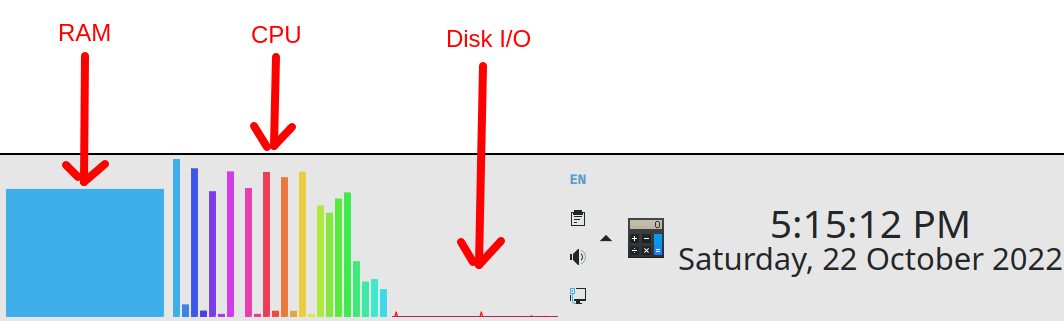
So I upgraded my Ubuntu from 20.04 to 22.04. That mostly went without problem but there are still a few gremlins to iron out. One change was some of the desktop widgets I was using in the previous version seem to have been replaced. I found the replacements easily enough. I particularly like the new CPU activity widget, it’s a much more sensible way to visualise 24 CPU cores than the previous widget which just gave one reading instead of 24.
A little nostalgia: The UNIX Time-Sharing System.