
So I wanted to know the keyboard shortcut to navigate between matching braces in my PHP (and other) code in NetBeans. I’m running NetBeans 8.2. So I searched and found General Editor Features which said “to find a shortcut for a specific command, type the command name in the Search field.” So the Search field they’re talking about is on the Keymap screen under Tools -> Options. After creating myself a custom Keymap Profile based on the NetBeans default settings I searched in the ‘Search:’ box for ‘match’ and found ‘Insertion Point to Matching Brace’ which is Ctrl+OPEN_BRACKET. Everything is easy when you know how!
Tag Archives: php
Fixing curl SSL certificate problem
So I was having an issue with curl (actually the PHP client at first, but also with the command-line version).
The issue manifested like this:
jj5@orac:~/temp/curl$ curl https://test.jj5.net/my-file.txt
curl: (60) SSL certificate problem: unable to get local issuer certificate
More details here: http://curl.haxx.se/docs/sslcerts.html

curl performs SSL certificate verification by default, using a "bundle"
 of Certificate Authority (CA) public keys (CA certs). If the default
 bundle file isn't adequate, you can specify an alternate file
 using the --cacert option.
If this HTTPS server uses a certificate signed by a CA represented in
 the bundle, the certificate verification probably failed due to a
 problem with the certificate (it might be expired, or the name might
 not match the domain name in the URL).
If you'd like to turn off curl's verification of the certificate, use
 the -k (or --insecure) option.
I ran the command in strace:
jj5@orac:~/temp/curl$ strace curl https://test.jj5.net/my-file.txt 2>&1 | less
Noticed this strace output:
stat("/etc/ssl/certs/8d28ae65.0", 0x7ffc33143630) = -1 ENOENT (No such file or directory)
There was no /etc/ssl/certs/8d28ae65.0 file.
I found a copy of 8d28ae65.0 here:
-----BEGIN CERTIFICATE-----
MIIGCDCCA/CgAwIBAgIQKy5u6tl1NmwUim7bo3yMBzANBgkqhkiG9w0BAQwFADCB
hTELMAkGA1UEBhMCR0IxGzAZBgNVBAgTEkdyZWF0ZXIgTWFuY2hlc3RlcjEQMA4G
A1UEBxMHU2FsZm9yZDEaMBgGA1UEChMRQ09NT0RPIENBIExpbWl0ZWQxKzApBgNV
BAMTIkNPTU9ETyBSU0EgQ2VydGlmaWNhdGlvbiBBdXRob3JpdHkwHhcNMTQwMjEy
MDAwMDAwWhcNMjkwMjExMjM1OTU5WjCBkDELMAkGA1UEBhMCR0IxGzAZBgNVBAgT
EkdyZWF0ZXIgTWFuY2hlc3RlcjEQMA4GA1UEBxMHU2FsZm9yZDEaMBgGA1UEChMR
Q09NT0RPIENBIExpbWl0ZWQxNjA0BgNVBAMTLUNPTU9ETyBSU0EgRG9tYWluIFZh
bGlkYXRpb24gU2VjdXJlIFNlcnZlciBDQTCCASIwDQYJKoZIhvcNAQEBBQADggEP
ADCCAQoCggEBAI7CAhnhoFmk6zg1jSz9AdDTScBkxwtiBUUWOqigwAwCfx3M28Sh
bXcDow+G+eMGnD4LgYqbSRutA776S9uMIO3Vzl5ljj4Nr0zCsLdFXlIvNN5IJGS0
Qa4Al/e+Z96e0HqnU4A7fK31llVvl0cKfIWLIpeNs4TgllfQcBhglo/uLQeTnaG6
ytHNe+nEKpooIZFNb5JPJaXyejXdJtxGpdCsWTWM/06RQ1A/WZMebFEh7lgUq/51
UHg+TLAchhP6a5i84DuUHoVS3AOTJBhuyydRReZw3iVDpA3hSqXttn7IzW3uLh0n
c13cRTCAquOyQQuvvUSH2rnlG51/ruWFgqUCAwEAAaOCAWUwggFhMB8GA1UdIwQY
MBaAFLuvfgI9+qbxPISOre44mOzZMjLUMB0GA1UdDgQWBBSQr2o6lFoL2JDqElZz
30O0Oija5zAOBgNVHQ8BAf8EBAMCAYYwEgYDVR0TAQH/BAgwBgEB/wIBADAdBgNV
HSUEFjAUBggrBgEFBQcDAQYIKwYBBQUHAwIwGwYDVR0gBBQwEjAGBgRVHSAAMAgG
BmeBDAECATBMBgNVHR8ERTBDMEGgP6A9hjtodHRwOi8vY3JsLmNvbW9kb2NhLmNv
bS9DT01PRE9SU0FDZXJ0aWZpY2F0aW9uQXV0aG9yaXR5LmNybDBxBggrBgEFBQcB
AQRlMGMwOwYIKwYBBQUHMAKGL2h0dHA6Ly9jcnQuY29tb2RvY2EuY29tL0NPTU9E
T1JTQUFkZFRydXN0Q0EuY3J0MCQGCCsGAQUFBzABhhhodHRwOi8vb2NzcC5jb21v
ZG9jYS5jb20wDQYJKoZIhvcNAQEMBQADggIBAE4rdk+SHGI2ibp3wScF9BzWRJ2p
mj6q1WZmAT7qSeaiNbz69t2Vjpk1mA42GHWx3d1Qcnyu3HeIzg/3kCDKo2cuH1Z/
e+FE6kKVxF0NAVBGFfKBiVlsit2M8RKhjTpCipj4SzR7JzsItG8kO3KdY3RYPBps
P0/HEZrIqPW1N+8QRcZs2eBelSaz662jue5/DJpmNXMyYE7l3YphLG5SEXdoltMY
dVEVABt0iN3hxzgEQyjpFv3ZBdRdRydg1vs4O2xyopT4Qhrf7W8GjEXCBgCq5Ojc
2bXhc3js9iPc0d1sjhqPpepUfJa3w/5Vjo1JXvxku88+vZbrac2/4EjxYoIQ5QxG
V/Iz2tDIY+3GH5QFlkoakdH368+PUq4NCNk+qKBR6cGHdNXJ93SrLlP7u3r7l+L4
HyaPs9Kg4DdbKDsx5Q5XLVq4rXmsXiBmGqW5prU5wfWYQ//u+aen/e7KJD2AFsQX
j4rBYKEMrltDR5FL1ZoXX/nUh8HCjLfn4g8wGTeGrODcQgPmlKidrv0PJFGUzpII
0fxQ8ANAe4hZ7Q7drNJ3gjTcBpUC2JD5Leo31Rpg0Gcg19hCC0Wvgmje3WYkN5Ap
lBlGGSW4gNfL1IYoakRwJiNiqZ+Gb7+6kHDSVneFeO/qJakXzlByjAA6quPbYzSf
+AZxAeKCINT+b72x
-----END CERTIFICATE-----
I made a copy of the cert here:
root@orac:/usr/local/share/ca-certificates# ll 8d28ae65.crt
-rw-r--r-- 1 root staff 2.2K Feb 21 06:53 8d28ae65.crt
I checked what it had to say about itself:
root@orac:/usr/local/share/ca-certificates# openssl x509 -in 8d28ae65.crt -text -noout
Certificate:
    Data:
        Version: 3 (0x2)
        Serial Number:
            2b:2e:6e:ea:d9:75:36:6c:14:8a:6e:db:a3:7c:8c:07
    Signature Algorithm: sha384WithRSAEncryption
        Issuer: C=GB, ST=Greater Manchester, L=Salford, O=COMODO CA Limited, CN=COMODO RSA Certification Authority
        Validity
            Not Before: Feb 12 00:00:00 2014 GMT
            Not After : Feb 11 23:59:59 2029 GMT
        Subject: C=GB, ST=Greater Manchester, L=Salford, O=COMODO CA Limited, CN=COMODO RSA Domain Validation Secure Server CA
        Subject Public Key Info:
            Public Key Algorithm: rsaEncryption
                Public-Key: (2048 bit)
                Modulus:
                    00:8e:c2:02:19:e1:a0:59:a4:eb:38:35:8d:2c:fd:
                    01:d0:d3:49:c0:64:c7:0b:62:05:45:16:3a:a8:a0:
                    c0:0c:02:7f:1d:cc:db:c4:a1:6d:77:03:a3:0f:86:
                    f9:e3:06:9c:3e:0b:81:8a:9b:49:1b:ad:03:be:fa:
                    4b:db:8c:20:ed:d5:ce:5e:65:8e:3e:0d:af:4c:c2:
                    b0:b7:45:5e:52:2f:34:de:48:24:64:b4:41:ae:00:
                    97:f7:be:67:de:9e:d0:7a:a7:53:80:3b:7c:ad:f5:
                    96:55:6f:97:47:0a:7c:85:8b:22:97:8d:b3:84:e0:
                    96:57:d0:70:18:60:96:8f:ee:2d:07:93:9d:a1:ba:
                    ca:d1:cd:7b:e9:c4:2a:9a:28:21:91:4d:6f:92:4f:
                    25:a5:f2:7a:35:dd:26:dc:46:a5:d0:ac:59:35:8c:
                    ff:4e:91:43:50:3f:59:93:1e:6c:51:21:ee:58:14:
                    ab:fe:75:50:78:3e:4c:b0:1c:86:13:fa:6b:98:bc:
                    e0:3b:94:1e:85:52:dc:03:93:24:18:6e:cb:27:51:
                    45:e6:70:de:25:43:a4:0d:e1:4a:a5:ed:b6:7e:c8:
                    cd:6d:ee:2e:1d:27:73:5d:dc:45:30:80:aa:e3:b2:
                    41:0b:af:bd:44:87:da:b9:e5:1b:9d:7f:ae:e5:85:
                    82:a5
                Exponent: 65537 (0x10001)
        X509v3 extensions:
            X509v3 Authority Key Identifier:
                keyid:BB:AF:7E:02:3D:FA:A6:F1:3C:84:8E:AD:EE:38:98:EC:D9:32:32:D4

            X509v3 Subject Key Identifier:
                90:AF:6A:3A:94:5A:0B:D8:90:EA:12:56:73:DF:43:B4:3A:28:DA:E7
            X509v3 Key Usage: critical
                Digital Signature, Certificate Sign, CRL Sign
            X509v3 Basic Constraints: critical
                CA:TRUE, pathlen:0
            X509v3 Extended Key Usage:
                TLS Web Server Authentication, TLS Web Client Authentication
            X509v3 Certificate Policies:
                Policy: X509v3 Any Policy
                Policy: 2.23.140.1.2.1

            X509v3 CRL Distribution Points:

                Full Name:
                  URI:http://crl.comodoca.com/COMODORSACertificationAuthority.crl

            Authority Information Access:
                CA Issuers - URI:http://crt.comodoca.com/COMODORSAAddTrustCA.crt
                OCSP - URI:http://ocsp.comodoca.com

    Signature Algorithm: sha384WithRSAEncryption
         4e:2b:76:4f:92:1c:62:36:89:ba:77:c1:27:05:f4:1c:d6:44:
         9d:a9:9a:3e:aa:d5:66:66:01:3e:ea:49:e6:a2:35:bc:fa:f6:
         dd:95:8e:99:35:98:0e:36:18:75:b1:dd:dd:50:72:7c:ae:dc:
         77:88:ce:0f:f7:90:20:ca:a3:67:2e:1f:56:7f:7b:e1:44:ea:
         42:95:c4:5d:0d:01:50:46:15:f2:81:89:59:6c:8a:dd:8c:f1:
         12:a1:8d:3a:42:8a:98:f8:4b:34:7b:27:3b:08:b4:6f:24:3b:
         72:9d:63:74:58:3c:1a:6c:3f:4f:c7:11:9a:c8:a8:f5:b5:37:
         ef:10:45:c6:6c:d9:e0:5e:95:26:b3:eb:ad:a3:b9:ee:7f:0c:
         9a:66:35:73:32:60:4e:e5:dd:8a:61:2c:6e:52:11:77:68:96:
         d3:18:75:51:15:00:1b:74:88:dd:e1:c7:38:04:43:28:e9:16:
         fd:d9:05:d4:5d:47:27:60:d6:fb:38:3b:6c:72:a2:94:f8:42:
         1a:df:ed:6f:06:8c:45:c2:06:00:aa:e4:e8:dc:d9:b5:e1:73:
         78:ec:f6:23:dc:d1:dd:6c:8e:1a:8f:a5:ea:54:7c:96:b7:c3:
         fe:55:8e:8d:49:5e:fc:64:bb:cf:3e:bd:96:eb:69:cd:bf:e0:
         48:f1:62:82:10:e5:0c:46:57:f2:33:da:d0:c8:63:ed:c6:1f:
         94:05:96:4a:1a:91:d1:f7:eb:cf:8f:52:ae:0d:08:d9:3e:a8:
         a0:51:e9:c1:87:74:d5:c9:f7:74:ab:2e:53:fb:bb:7a:fb:97:
         e2:f8:1f:26:8f:b3:d2:a0:e0:37:5b:28:3b:31:e5:0e:57:2d:
         5a:b8:ad:79:ac:5e:20:66:1a:a5:b9:a6:b5:39:c1:f5:98:43:
         ff:ee:f9:a7:a7:fd:ee:ca:24:3d:80:16:c4:17:8f:8a:c1:60:
         a1:0c:ae:5b:43:47:91:4b:d5:9a:17:5f:f9:d4:87:c1:c2:8c:
         b7:e7:e2:0f:30:19:37:86:ac:e0:dc:42:03:e6:94:a8:9d:ae:
         fd:0f:24:51:94:ce:92:08:d1:fc:50:f0:03:40:7b:88:59:ed:
         0e:dd:ac:d2:77:82:34:dc:06:95:02:d8:90:f9:2d:ea:37:d5:
         1a:60:d0:67:20:d7:d8:42:0b:45:af:82:68:de:dd:66:24:37:
         90:29:94:19:46:19:25:b8:80:d7:cb:d4:86:28:6a:44:70:26:
         23:62:a9:9f:86:6f:bf:ba:90:70:d2:56:77:85:78:ef:ea:25:
         a9:17:ce:50:72:8c:00:3a:aa:e3:db:63:34:9f:f8:06:71:01:
         e2:82:20:d4:fe:6f:bd:b1
Seems legit! :)
So I installed it:
root@orac:/usr/local/share/ca-certificates# update-ca-certificates
Bug fixed!
PDO: Execute a prepared statement using array for IN clause
See Example #5 here.
/* Execute a prepared statement using an array of values for an IN clause */
$params = array(1, 21, 63, 171);
/* Create a string for the parameter placeholders filled to the number of params */
$place_holders = implode(',', array_fill(0, count($params), '?'));

/*
    This prepares the statement with enough unnamed placeholders for every value
    in our $params array. The values of the $params array are then bound to the
    placeholders in the prepared statement when the statement is executed.
    This is not the same thing as using PDOStatement::bindParam() since this
    requires a reference to the variable. PDOStatement::execute() only binds
    by value instead.
*/
$sth = $dbh->prepare("SELECT id, name FROM contacts WHERE id IN ($place_holders)");
$sth->execute($params);
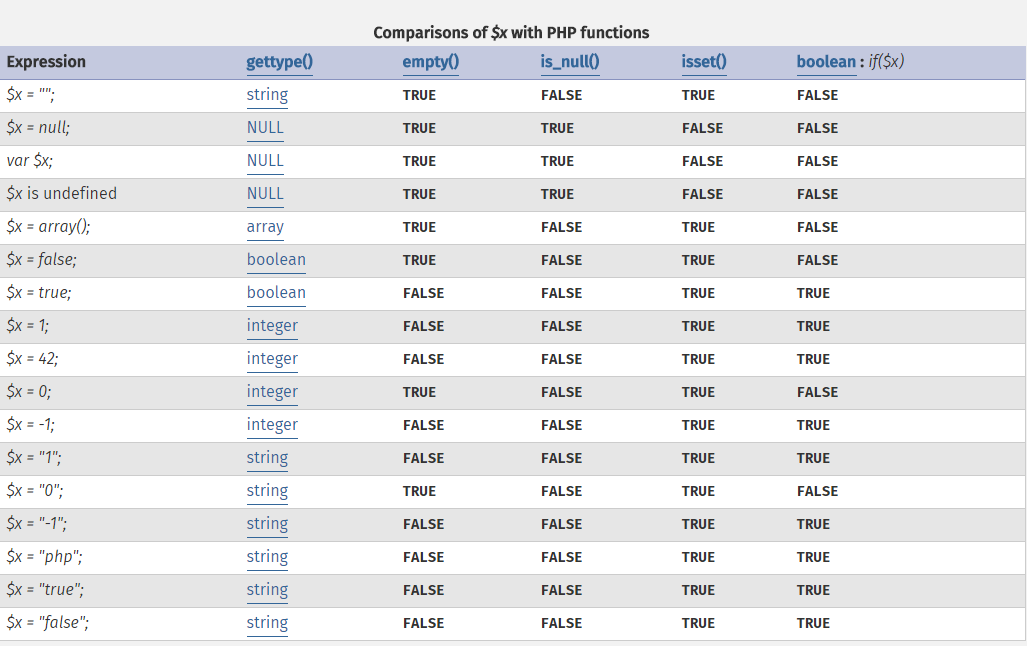
PHP values
USA Time Zones in PHP
Reply
See here for a list of US time zones.
Eastern ........... America/New_York
Central ........... America/Chicago
Mountain .......... America/Denver
Mountain no DST ... America/Phoenix
Pacific ........... America/Los_Angeles
Alaska ............ America/Anchorage
Hawaii ............ America/Adak
Hawaii no DST ..... Pacific/Honolulu
Xdebug trace != profile
So it just took me all night to figure out that in Xdebug ‘tracing’ is different to ‘profiling’.
It didn’t help that the xdebug.trace_output_name included an example format of ‘cachegrind.out.%s’. Why would you name a trace file cachegrind.out if only profile files are in cachegrind format!?
In my efforts to get profiling to work I found myself loading trace files into KCachegrind and getting the rather unhelpful message: “Could not open the file “/run/shm/xdebug/trace…xt”. Check it exists and you have enough permissions to read it.”
So the error message is about file permissions. I checked and checked and checked again but the file permissions were OK. The problem was I was loading a trace file, not a profile file.
So I gave up on KCachegrind and tried to get webgrind to work. Turns out loading a trace file (not a profile file) into webgrind doesn’t work either. I got the same problem reported by Sven about ‘parsers is undefined’. I fucked around trying to update the jquery.tablesorter plugin in webgrind, but the problem was due to the fact I was loading a tracing file, not a profiling file.
In the end I got it all figured out. Here’s my /etc/php5/mods-enabled/xdebug.ini file:
zend_extension=/usr/lib/php5/20131226/xdebug.so
xdebug.remote_enable=1
xdebug.remote_handler=dbgp
xdebug.remote_mode=req
;xdebug.remote_host=127.0.0.1
xdebug.remote_host=10.1.1.203
;xdebug.remote_port=9000
xdebug.remote_port=9999

; http://www.xdebug.org/docs/all

xdebug.profiler_enable=1
xdebug.profiler_output_dir=/run/shm/xdebug
xdebug.profiler_output_name=cachegrind.out.%t.%R

xdebug.auto_trace=1
xdebug.collect_assignments=1
xdebug.collect_includes=1
xdebug.collect_params=4
xdebug.collect_return=1
xdebug.collect_vars=0
xdebug.show_mem_delta=1
;2 for HTML:
xdebug.trace_format=0
xdebug.trace_options=1
xdebug.trace_output_dir=/run/shm/xdebug
xdebug.trace_output_name=trace.%t.%R
xdebug.var_display_max_children=-1
xdebug.var_display_max_data=-1
xdebug.var_display_max_depth=-1
The above config supports generation of tracing files and profiling files. I can now load my profiling files into KCachegrind and webgrind.
Everything is easy when you know how!
Wildcard matching with PHP and fnmatch
Today I learned about the fnmatch function in PHP. It supports wildcard matching. Handy!
jQuery htmlspecialchars equivalent to encode text as HTML
Found this which said:
$('<div/>').text('This is fun & stuff').html();
Piping PHP CLI output to less broken
Today I had an interesting problem.
When I ran:
# php test.php | less
The ‘less’ program entered input mode and the up and down arrow (and j, k keys) weren’t working.
Eventually I figured out a solution:
# php test.php < /dev/null | less
The PHP CLI seems to be interfering with the terminal and piping in /dev/null to PHP CLI stdin fixes the problem!
PHP DateTimeZone->getOffset()
Today I had to use PHP’s DateTimeZone->getOffset() to get a timezone offset. It needed formatting which I did with:
function timezone_offset() {
  $offset = timezone()->getOffset( now() );
  $hours = round( abs( $offset ) / 3600 );
  $minutes = round( ( abs( $offset ) - $hours * 3600 ) / 60 );
  $result = ( $offset < 0 ? '-' : '+' )
    . ( $hours < 10 ? '0' : '' ) . $hours
    . ':'
    . ( $minutes < 10 ? '0' : '' ) . $minutes;
  return $result;
}